About us
About School of Gaming
Where Screen Time Becomes Quality Time. We bring together children, skilled Game Educators and the games children already love. Through Minecraft, Roblox, Fortnite and many others, we create playful learning that children share with like-minded friends, in a place that is fun, guided by a safe adult.
“What is true now, was once just your imagination.”
— The Princi-Pal
Our mission
Not all screen time is equal, and gaming comes in many forms too. At School of Gaming we work hard to make gaming a great hobby for a child, one whose good effects last a lifetime, like so many other good hobbies that children and parents love.
Meet the teamThings we care about
Play never ends here
Play is a child’s work. It matters enormously for their wellbeing and development. Our clubs are built for free play that feeds imagination, curiosity and creativity: strong tools for whatever the future brings.
We believe in the power of friendship
We all need friends. But how do you become a good friend to someone? We believe play and good friends can carry a child over any obstacle in life. That is why, in our clubs, children practise their friendship skills under cover of play and adventure.
Keeping children safe online
There are no private messages on our platform. Clubs meet in a virtual room whose chat everyone can see. Every gamer account is created by a parent, who links it to their own. The parent also chooses how the child signs in: through the parent’s account alone, or with a username or a verified email address and a password of their own. We have zero tolerance for bullying and toxic behaviour.
We keep the whole family involved
Parents are our partners in their child’s hobby. As a parent, you stay in charge of your child’s gaming. While they enjoy the freedom to explore, create and make friends in a safe place, you can get to know gaming, game education and children’s digital learning through our events, guides and newsletters for parents.
How our clubs work
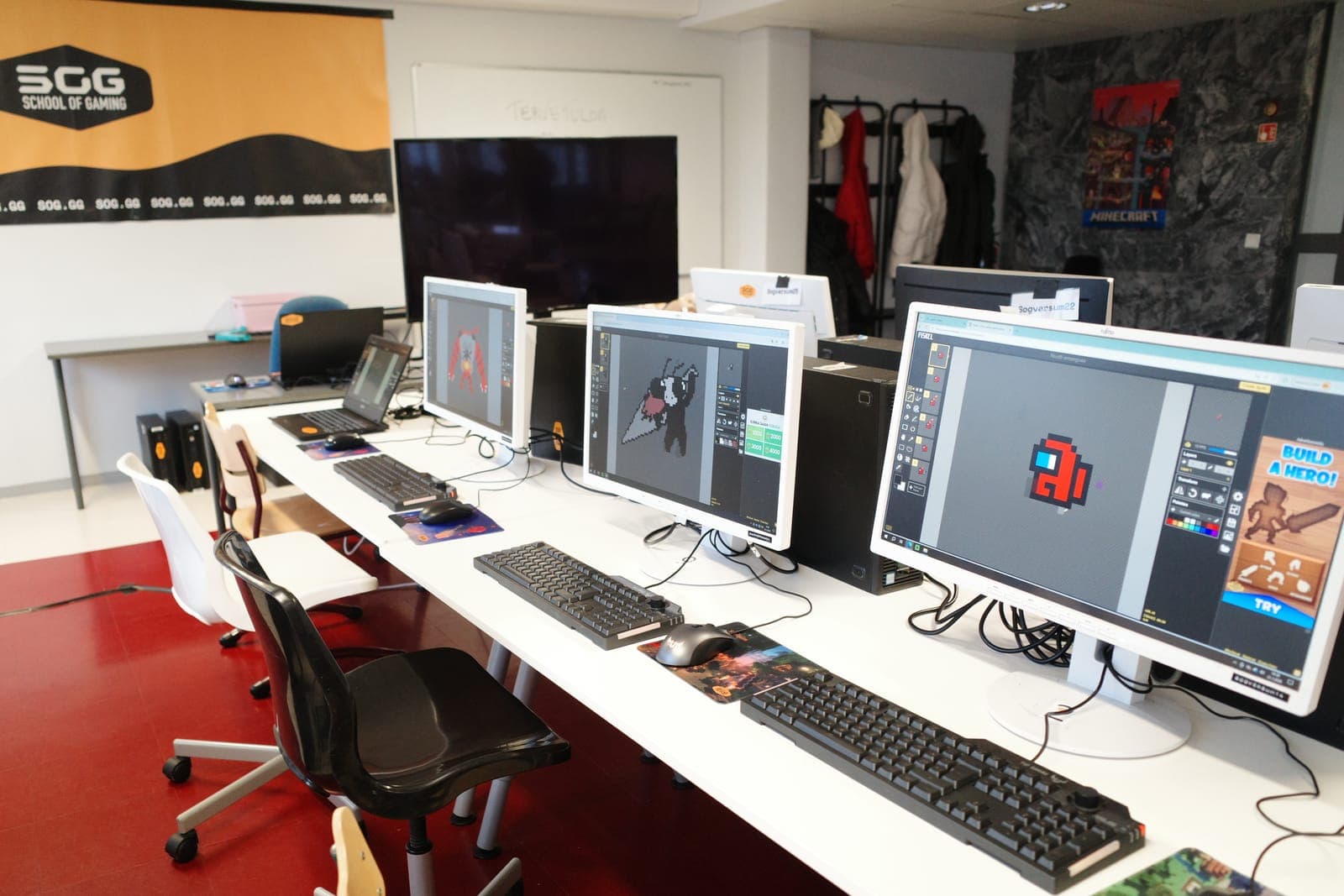
When the best part of the week arrives and our gamers log in for their lesson, a familiar face is waiting: their own Gedu, one of our trained Game Educators. The Gedu leads the group into the day’s topic and leaves everyone room to make the adventure their own. Now and then we huff and puff through an exercise break and get up off our chairs.
Our Gedus are gamers themselves. They know from experience what it is like to build an identity and make friends, online and off.
Every lesson is built around a story we thought up ourselves and wrote by hand. Each week our gamers explore mysterious corners, give their grey cells a workout, make something new and wonderful, and use their imagination. Between lessons there are fun challenges to try online or in real life, and community events on our platform. In the school holidays we run popular camps where the story and the adventure carry on.
We are a bit like scouts of the internet. Scouts have their forest; we have the digital world around us. Both call for much the same survival skills, and both are better travelled in a group. And yes, we take an oath too. Every gamer swears, cross my heart and hope to lag, to be kind, helpful and fair: in the game, on voice chat and in everyday life. The same rules apply everywhere.
For parents
Game education for parents is as much a part of what we do as the clubs themselves. Psst, here is a secret: sometimes we think parents need it even more than the children do.
We want to help parents keep up with a gaming world that never stops changing, so they can support their children with confidence. We have even got plenty of parents excited about gaming. Our gaming clubs for parents have become very popular, and parents have called them “mentally liberating” and “therapeutic teamwork”. We will take that.
It matters to us that you feel we are on the same side. You stay in charge: you manage the accounts, enrolments and spending. We make sure your child plays in a good group led by a safe adult. Let’s turn screen time into quality time together.
What parents tell us
“The club is the highlight of my son’s week. Every week, my quiet and shy boy transforms into a laughing, loudly chatting child when he gets to interact with like-minded kids. The club’s content and the educators’ expertise have pleasantly surprised me.”
“Gaming is fun and supervised. No bullying, no arguing, or bad vibes.”
“School of Gaming has been a really positive experience for both the child and the parents. The children have had great gaming experiences with new friends in a safe gaming environment with experienced instructors – I can recommend it!”
“Nothing else, no activity or hobby, has made my child sigh with happiness like this.”
“Large groups make our child anxious. This is the perfect way for us to engage in a hobby and make new friends.”
“My daughter’s Finnish has improved tremendously in just a month! The gaming educators have been very skilled, friendly, and patient. This really works!”
Frequently asked questions
What is Sogverse?
Sogverse is School of Gaming’s platform, where we run clubs, camps and events in Minecraft, Roblox, Fortnite and other games. In other words, the very site you are on now.
Look a little deeper and Sogverse is also the name of our story’s world: the gaming universe where School of Gaming sits and gamers go on adventures.
Is this school?
No. At least, not an ordinary one. Still, School of Gaming is the most fun school in the world, where gaming is a great hobby. We have no exams and no pop quizzes. Nobody has to perform, and nobody is graded. Everyone is welcome just as they are.
A Gedu is not a teacher but more of a guide and companion through digital worlds. After every lesson the Gedu writes up what the group did, so you are better prepared for conversations over supper about building Nether portals and the best battle royale strategies.
What ages is this for?
For gamers aged 7 to 17. Every club, camp and event has its own age range. You will find it on its page in the shop, and the age filter on the shop’s main page finds what suits your child.
Games have their own age ratings too, shown on the same page. In Finland we follow the national age-rating guidance: a child may play a game rated up to three years above their own age when a parent is present and agrees to it.
Which games do you run, and does my child need to own the game?
We play Minecraft (Java, Bedrock and Education), Roblox Studio, Fortnite, Rocket League and Pokémon GO, among others. There will certainly be more in future, perhaps even board games, role-playing games or chess. Games can be paired with themes such as esports, game design, robotics, programming, animation and game music.
We favour free games, but some cost money, such as Minecraft Java. Fortnite, Rocket League, Pokémon GO and Roblox Studio are free to download, and your child only needs a free account for them. The cost of a paid game is not included in our price. In some cases the edition matters too, so each page says which one you need and where to get it.
Minecraft Education is the school edition of Minecraft. There is nothing to buy and no school account to arrange: we are an official Minecraft Education partner and give you the accounts you need. The game itself is a free download.
What equipment does my child need?
It depends on the game, and every club, camp and event says so on its own page.
Minecraft Java needs a computer running Windows, macOS or Linux; the console, phone and tablet editions will not do. Minecraft Bedrock, on the other hand, runs on consoles, phones, tablets and Windows PCs.
Roblox Studio runs only on Windows PCs and Macs: not on a tablet, Chromebook, phone or console. Rocket League runs on Windows PCs, PlayStation, Xbox and Nintendo Switch. Pokémon GO needs a phone or tablet with GPS and mobile data, because it is played outdoors.
In online clubs the Gedu guides the group by voice, in the browser, so your child needs a microphone. The club’s own virtual room has a microphone picker and a way to test the sound. A webcam is not required.
What’s the difference between clubs, camps, and events?
Clubs meet on a recurring schedule. Camps run across multiple days during school breaks. Events are one-off get-togethers.
What does it cost, and how does billing work?
Prices are set per club, camp and event, and each shows its own price on its page, in euros and including VAT. How you pay depends on what you sign up for: a club is a monthly subscription, billed every month with no fixed term; a camp or an event is paid once when you sign up, with nothing further to pay; and a municipality club is paid for by the municipality, so there is nothing for you to pay.
Each child’s place in each club is its own monthly subscription, named after the child and the club. If you sign up before a club has started, nothing is charged that day: the page tells you the date of your first payment before you commit.
Your saved cards, invoices and subscriptions are in the Payment & billing card on My SOG, which opens the secure billing page of Stripe, the payment service we use.
Can I cancel, and what is your refund policy?
A club is a monthly subscription with no end date, and you always pay one month ahead. You can cancel whenever you like, and your child carries on in the club until the subscription ends. You manage it from the Payment & billing card on My SOG, which opens Stripe’s secure billing page.
Your child keeps their place until the end of the billing period you have already paid for. While the membership winds down, the club page shows the date of their last lesson.
Every club also comes with a 30-day money-back guarantee: if the club turns out not to suit your child, email help@sog.gg within 30 days of their first lesson and we refund what you paid for that club, no questions asked.
Camps are booked and paid as a one-off, so they work differently. Cancel 14 days or more before the camp starts and you get a full refund; between 7 and 14 days before, we refund you minus a €50 handling fee; less than 7 days before, we cannot refund the payment, because the place has been held and prepared for your child. The exception is a sudden illness or something else genuinely outside your control: if your child cannot come because they are ill, send a doctor’s certificate to help@sog.gg and we refund you.
I have several children. How do accounts and payments work?
You have one parent account, and you create a gamer account for each child on My SOG: first name, birth month and year, and optionally gender.
A child never creates an account of their own. On My SOG, each child’s place in each club is its own line, so you can see and cancel them one at a time, and look at each more closely from the Payment & billing card. There is no family bundle to buy and no separate account to set up for each child.
We also offer sibling discounts. Ask us about them at help@sog.gg.
What language is a club led in?
Every club, camp and event is led in one language, shown on its page. You can also filter the shop by language.
The language of a club or camp is a different thing from the language you read the site in. You choose that one in the site’s top bar, and changing it changes the app, not the language your child’s clubs and camps are led in. A Finnish-speaking parent can read the site in Finnish and sign their child up for an English-language club, for example.
What is a municipality club, and how do we join one?
A municipality club is a club we run together with a Finnish municipality. Depending on the municipality, it meets online from home or in person at your child’s school, a youth centre or a library. Either way, a School of Gaming Game Educator leads it. The municipality pays for the club, so there is nothing for you to pay when you sign up.
Places are limited and clubs often have a waiting list, so if your child stops coming, please tell us so the place can go to the next child. Within your municipality you can join any of its clubs, even one held at a school other than your child’s. We also run clubs open to everyone, which a child can join wherever they live.
Who leads the lessons, and how are Gedus vetted?
Every lesson is led by a Gedu, one of School of Gaming’s trained Game Educators. All our Gedus are gamers themselves and know how to support and guide children in the game and outside it. Every Gedu goes through our thorough Gedu training and is interviewed by our recruitment lead, and applicants who have already worked with children come first.
We require every Gedu to show us a criminal record extract for working with children before they start.
Can strangers contact my child, and is anything recorded?
In short: strangers cannot contact your child. Voice and video are not recorded. The club’s text chat is kept for its Gedus and our admins.
A club’s virtual room is not a public room anyone can find. It exists only around that group’s lesson: it opens five minutes before the lesson starts and closes five minutes after it ends, and the only people who can enter are the members of that group, a Game Educator working on that club, and School of Gaming admins. Our server checks this every time someone joins, so a child with no place in that group has no way in.
There are no private messages on our platform, and the chat in the virtual room is visible to the whole group and the Gedu. The chat lives in the lesson’s room, and once the room closes it cannot be opened again. We do keep it, so that the Gedus running the club and our admins can look back at it if something comes up.
The lesson itself is not recorded. Nothing in the app records, transcribes or stores the voice or video of a lesson, and the room has no recording controls.
Only the Gedu and admins hold the moderator controls. With them they can mute and lock microphones, turn off and lock cameras, mute someone in the chat, move group members from one voice channel to another, and make the Gedu heard in every channel at once.
Chat inside a game is a separate thing, but on School of Gaming’s Minecraft servers, for example, everyone is a School of Gaming member and there are no outsiders. There, the Gedus and admins can moderate the in-game chat by muting a player, removing them from it for a while, or keeping them out of it for a set time.
How does my child sign in, and what is the parent PIN?
On My SOG you choose, for each child, how they sign in.
By default a gamer account has no sign-in of its own: it carries an internal Sogverse address rather than a real email address. It is linked to your parent account, and your child enters Sogverse by switching from your profile to theirs. If you prefer, you can create a username and password for them, or add their own email address, which they verify before setting a password through the normal reset flow.
Whichever you choose, a child’s sign-in opens only their own account: a child who signed in with their own username or email cannot switch to your account or a sibling’s at all.
Getting into the parent side takes a four-digit PIN that only you know, so a password saved in the browser is not enough to buy anything or to use your parent account, and the session locks again the moment you switch to a child’s profile or sign out.
If you forget the PIN, we email a reset link to the address on your account and nowhere else. A child pressing “Forgot your PIN?” simply sends you an email.
What do you store about my child?
- About your child we store their first name, their birth month and year, and optionally their gender.
- We link your family surname to your child, because your child is part of your family. It is shown to nobody outside your family: a Gedu’s roster and the virtual room show only your child’s first name, their age and any game username you have added.
- Their account carries an internal Sogverse address rather than a real email address, unless you have let your child sign in with their own email address, in which case we keep that address. Either way, your child’s email address is not shown on a Gedu’s roster or in the virtual room.
- If you choose, we store their username in the games their clubs use (today Minecraft and Roblox) and the id that game gives them, so we can recognise them in a lesson.
- Their in-game character picture is loaded from that game’s own servers, so the username reaches Minecraft or Roblox whenever the roster loads. The account’s profile picture is not a photo: with no game account linked, the image beside their name is a pattern generated from their account id.
Alongside that we keep what running a club requires: which clubs, camps and events your child is signed up for, their attendance, the lesson reports and short staff notes their Gedus write, the chat from their lessons and any pictures posted in it, anything they make that a Gedu links to their group, the consents recorded against their place, and the pictures a Gedu attaches to a report. A Gedu’s moderation is on record too: if a child is moved into a space of their own or muted in the chat, that leaves a record. The report pictures are of the lesson rather than of one child: every family in the group sees them on the group’s page and receives them with the report by email.
To see, correct or delete anything we hold about your child, email help@sog.gg. We keep your information for as long as you have an account and delete or anonymise it if you close it, except where the law requires us to keep certain records longer, as Finnish accounting law does for payment records.
How do I get started?
Create a parent account, add your child as a gamer on My SOG, then find a club that suits them in the shop and sign them up. When you sign up, you are asked who the place is for, and prompted to add a gamer if you have not yet. Once you have signed up, the club appears on My SOG for both of you.
Your child joins lessons through your account, unless you let them use a sign-in of their own from My SOG.
How do I become a Game Educator?
You can apply at geduacademy.com.
We invite suitable applicants to training and an interview. After that you can start as a trainee, an assistant and a substitute, and from there the way opens to running club groups of your own.
You can also ask us more at help@sog.gg.
What is Yty?
Yty is the force that keeps Sogverse, School of Gaming’s gaming universe, in balance. By doing good things, learning new skills, making friends, behaving well and taking part in the community, gamers earn Yty for the shared pool and for themselves.
How Yty works
Every gamer starts at zero Yty-Points. From every lesson, every Quest completed and every act of kindness, gamers earn Yty-Points. The points build up across the Four Yty-Elements, each one a different side of growing as a person.
As gamers collect Yty for themselves, they also grow the Yty of the whole community. That is how they shape the shared story and open up new possibilities for everyone.
The Four Yty-Elements
Each Yty-Element is one relationship a gamer is growing: with themselves, with others, with the world and with technology
Harmony
Relationship with yourself
Who am I? Harmony is about accepting yourself as you are, strengths and weaknesses alike. It means getting to know yourself, looking after your wellbeing, expressing your feelings, making good decisions, and understanding why rules and trust matter.
Glow
Relationship with others
How can I help others? How can I be a good friend? Glow is about empathy, kindness and building meaningful relationships. It means respecting differences, giving others space, communicating well, and being the kind of person who lifts people up.
Valor
Relationship with the world
How can I make a difference? Valor is about finding your place in the world around you and having the courage to take part in it. It means teamwork, voicing your ideas, using your imagination, and working towards a better future, close to home and across the globe.
Wit
Relationship with technology
How do I use technology well? Wit is a healthy, critical relationship with games, media, AI and the tools around them. It means taking good online behaviour to heart, understanding what new technologies do, thinking critically about information, and finding a balance between screen time and the rest of life.
How gamers earn Yty
Yty-Points are earned by taking an active part in what we do. Weekly lessons, completed Quests, kindness to others, community events and camps all build a gamer’s Yty.
When enough points build up under an Achievement Badge, the badge rises on the gamer’s profile, all the way to diamond. Every Yty-Point also adds to the gamer’s overall Yty-Level and to the Yty-Element it belongs to.
Gedus, parents and the whole community can add to the Yty of Sogverse too, through events and shared activities.